Configure permissions
- URL: https://platform.claude.com/docs/en/agent-sdk/permissions.md
- Retrieved: 2026-01-08T05:11:32.471541+00:00
Configure permissions
Control how your agent uses tools with permission modes, hooks, and declarative allow/deny rules.
The Claude Agent SDK provides permission controls to manage how Claude uses tools. Use permission modes and rules to define what's allowed automatically, and the canUseTool callback to handle everything else at runtime.
How permissions are evaluated
When Claude requests a tool, the SDK checks permissions in this order:
deny rules first (block regardless of other rules), then allow rules (permit if matched), then ask rules (prompt for approval). These declarative rules let you pre-approve, block, or require approval for specific tools without writing code.
bypassPermissions, acceptEdits, dontAsk, etc.)
canUseTool callback for a decision
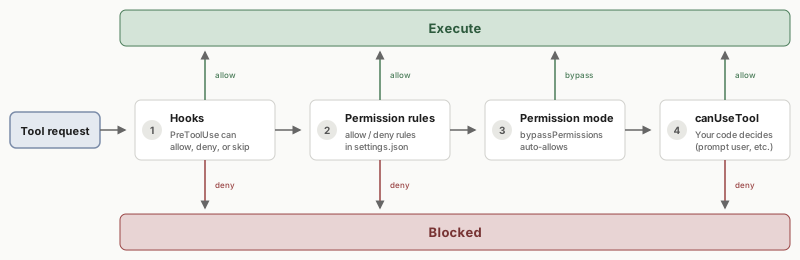
This page focuses on permission modes (step 3), the static configuration that controls default behavior. For the other steps:
- Hooks: run custom code to allow, deny, or modify tool requests. See Control execution with hooks.
- Permission rules: configure declarative allow/deny rules in
settings.json. See Permission settings. - canUseTool callback: prompt users for approval at runtime. See Handle approvals and user input.
Permission modes
Permission modes provide global control over how Claude uses tools. You can set the permission mode when calling query() or change it dynamically during streaming sessions.
Available modes
The SDK supports these permission modes:
| Mode | Description | Tool behavior |
|---|---|---|
default |
Standard permission behavior | No auto-approvals; unmatched tools trigger your canUseTool callback |
acceptEdits |
Auto-accept file edits | File edits and [filesystem operations] (mkdir, rm, mv, etc.) are automatically approved |
dontAsk |
Skip approval prompts | Auto-deny tools unless explicitly allowed by an allow rule |
bypassPermissions |
Bypass all permission checks | All tools run without permission prompts (use with caution) |
plan mode is not currently supported in the SDK.
Set permission mode
You can set the permission mode once when starting a query, or change it dynamically while the session is active.
permission_mode (Python) or permissionMode (TypeScript) when creating a query. This mode applies for the entire session unless changed dynamically.
<CodeGroup>

```python Python
import asyncio
from claude_agent_sdk import query, ClaudeAgentOptions

async def main():
    async for message in query(
        prompt="Help me refactor this code",
        options=ClaudeAgentOptions(
            permission_mode="default",  # Set the mode here
        ),
    ):
        if hasattr(message, "result"):
            print(message.result)

asyncio.run(main())
```

```typescript TypeScript
import { query } from "@anthropic-ai/claude-agent-sdk";

async function main() {
  for await (const message of query({
    prompt: "Help me refactor this code",
    options: {
      permissionMode: "default",  // Set the mode here
    },
  })) {
    if ("result" in message) {
      console.log(message.result);
    }
  }
}

main();
```

</CodeGroup>
set_permission_mode() (Python) or setPermissionMode() (TypeScript) to change the mode mid-session. The new mode takes effect immediately for all subsequent tool requests. This lets you start restrictive and loosen permissions as trust builds, for example switching to acceptEdits after reviewing Claude's initial approach.
<CodeGroup>

```python Python
import asyncio
from claude_agent_sdk import query, ClaudeAgentOptions

async def main():
    q = query(
        prompt="Help me refactor this code",
        options=ClaudeAgentOptions(
            permission_mode="default",  # Start in default mode
        ),
    )

    # Change mode dynamically mid-session
    await q.set_permission_mode("acceptEdits")

    # Process messages with the new permission mode
    async for message in q:
        if hasattr(message, "result"):
            print(message.result)

asyncio.run(main())
```

```typescript TypeScript
import { query } from "@anthropic-ai/claude-agent-sdk";

async function main() {
  const q = query({
    prompt: "Help me refactor this code",
    options: {
      permissionMode: "default",  // Start in default mode
    },
  });

  // Change mode dynamically mid-session
  await q.setPermissionMode("acceptEdits");

  // Process messages with the new permission mode
  for await (const message of q) {
    if ("result" in message) {
      console.log(message.result);
    }
  }
}

main();
```

</CodeGroup>
Mode details
Accept edits mode (acceptEdits)
Auto-approves file operations so Claude can edit code without prompting. Other tools (like Bash commands that aren't filesystem operations) still require normal permissions.
Auto-approved operations:
- File edits (Edit, Write tools)
- Filesystem commands: mkdir, touch, rm, mv, cp
Use when: you trust Claude's edits and want faster iteration, such as during prototyping or when working in an isolated directory.
Don't ask mode (dontAsk)
Auto-denies all tools unless explicitly permitted by an allow rule in settings.json. No prompts are shown.
Use when: running in non-interactive environments (CI/CD, batch processing) where you can't prompt users. Configure allow rules for the specific tools you need.
Bypass permissions mode (bypassPermissions)
Auto-approves all tool uses without prompts. Hooks still execute and can block operations if needed.
Related resources
For the other steps in the permission evaluation flow:
- Handle approvals and user input: interactive approval prompts and clarifying questions
- Hooks guide: run custom code at key points in the agent lifecycle
- Permission rules: declarative allow/deny rules in
settings.json